Zone 2 on Apple Watch: find your zones and understand your week
Apple Watch can show Heart Rate Zones during supported workouts. Start with Apple's own workout view, check how your zones are configured, and distinguish a single workout's zone breakdown from your weekly habit.
What Apple Watch already does
You do not need Base just to see a heart-rate zone during a supported Apple Watch workout. Apple's Workout app already provides a Heart Rate Zones view, and its documentation explains how to view and edit those zones.
Use the official guide linked here for the controls on your installed watchOS version. Workout views and available settings can vary by workout and software version. Screenshots from an older guide should not override the controls actually on your device.
A short setup checklist
Before comparing apps, check the basics. These steps concern Apple's features; they are not a claim that Base uses the same settings or produces identical totals.
- Start an appropriate workout in Apple's Workout app and look for the Heart Rate Zones workout view.
- Review Heart Rate Zones under Workout in the Watch settings or the iPhone Watch app. Check whether the zones are automatic or manual.
- Compare the actual lower and upper beats-per-minute limits, not only the label ‘zone 2’.
- After a recorded session, review its heart-rate and zone information in Apple's workout details.
A zone estimate is not a sensor reading
Heart rate is the measured or estimated beats-per-minute signal. A zone is a category applied to that signal. A Watch reading can be plausible while the zone label differs from an online calculator because the two systems use different boundaries.
That is why a disagreement does not by itself prove that the watch is inaccurate. First compare the method and inputs. Research in cyclists found substantial differences among common low-intensity markers; a fixed percentage is not a precise metabolic measurement for every person.
Evidence: Meixner et al. (2025): individual variability in zone 2 intensity markers
What Base adds
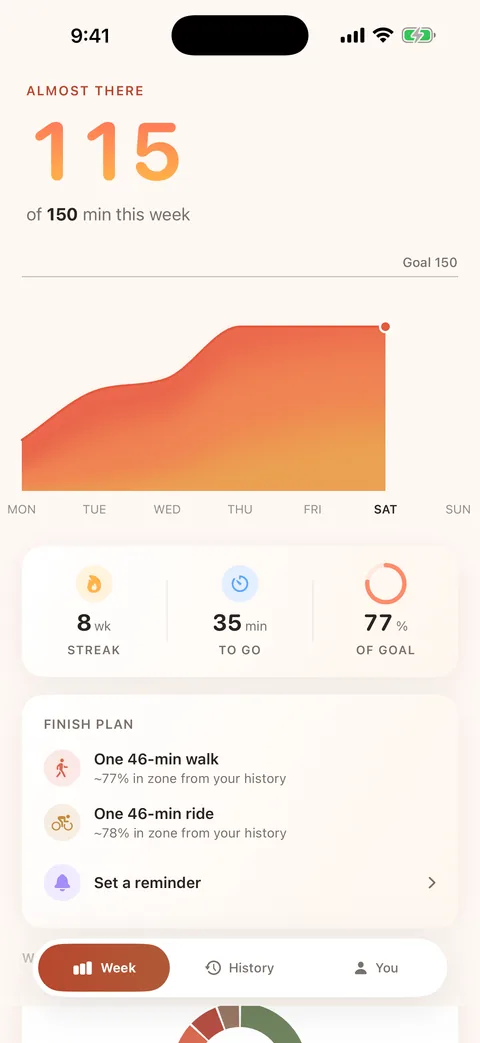
Base is being built around a narrower question: what did your recorded workouts contribute to this week? It gathers qualifying zone 2 time into a weekly view, rather than asking you to keep a manual log of every session.
Its product story includes weekly progress, source details, history and glanceable surfaces. Base processes health data on your devices. It does not need a health-data upload to make your week easier to read.
Base is not publicly available yet. The launch list is the way to hear when it is ready; this page is not a download claim. Keep using the workout tools you already have in the meantime.
Compare like with like
If two totals differ, first check that you are looking at the same date range, recorded workout and zone bounds. Total workout duration, Apple's Exercise Time and zone 2 time are different quantities. A 40-minute activity need not contain 40 minutes in a particular zone.
If Base is missing a recorded workout, the support page explains its Health access and evidence requirements. Do not send heart-rate screenshots or sensitive health details by email to troubleshoot a general setup question.
Sources & further reading
Source types matter: public-health guidance, product documentation and individual studies answer different questions. These sources do not endorse Base.
- Apple: view Heart Rate Zones on Apple WatchOfficial product documentation
- Meixner et al. (2025): individual variability in zone 2 intensity markersLaboratory study · 50 cyclists
From one workout to a weekly habit
Base is a zone 2 cardio tracker for iPhone and Apple Watch, designed to gather supported minutes from your recorded workouts into a weekly view. Health data stays on your devices. Base is preparing for launch; joining the list below is not an app download.